
[ez-toc]
📌 Table of Contents ▼
- 1. A Tiny Printer for Big Memories
- 2. Review Scorecard (Quick Take)
- 3. Key Features & Specifications
- 4. Design & Build Quality
- 5. Setup & Ease of Use
- 6. Performance & Daily Use
- 7. Battery Life & Durability
- 8. Extra Features
- 9. Comparisons & Alternatives
- Fujifilm Instax Mini Link 2
- HP Sprocket (2nd Edition)
- Canon Ivy
- 10. Who Should Buy the Kodak Step Printer?
- 11. Pros & Cons
- Pros
- Cons
- 12. Final Verdict
- 13. Why You Can Trust Us:
- 14. FAQs
- 1. Does the Kodak Step Instant Photo Printer produce high-quality prints?
- 2. How long do Zink prints last?
- 3. Is the Kodak Step printer good for kids or teens?
- 4. How often does the app glitch?
- 5. Does the printer work without Wi-Fi?
- 15. Related Posts
- Hzevn 100 Watt USB C Charger Review – Is This...
- Best Anker 6-Port Charging Station Review 2025: Fast Multi-Port Charger
- Anker Charger for iPhone 16 Pro Max Review 2025
- Apple AirTags 4Pack Review: The Smartest Way to Never Lose...
A Tiny Printer for Big Memories
So here’s a fun moment—I was talking to a friend who journals obsessively (like, “every coffee cup gets documented” obsessively). She told me she prints tiny photos every night, right from her phone, using the Kodak Step Instant Smartphone Photo Printer. And honestly, that got me thinking: Is this little palm-sized gadget actually worth all the hype in 2026?
Because you’ve probably seen this thing everywhere: TikTok craft videos, study vloggers, scrapbook influencers—you name it. At first glance, it feels like one of those cute gadgets you buy and forget. But the more I dug into user reviews, market trends, and the whole Zink-printing explosion, the more I realized: this printer sits in a surprisingly unique niche.
Today’s deep-dive kodak step instant smartphone photo printer review answers the real question:
Does it deliver enough convenience and quality to justify the price… or does it fall into the “fun but forgettable” category?
(Oh—and if you end up wanting one, you can check current price on Amazon early while you read.)
Review Scorecard (Quick Take)
- ⭐ Rating: Averaging 4.4/5 from more than 22,000 reviews—users love its convenience and compact size.
- 💰 Price: Around $79–$99, depending on color and bundles.
- 📸 Highlights: Truly pocketable, prints in under a minute, surprisingly durable Zink photos, super fun editing app.
- 😕 Drawbacks: The app glitches sometimes (you’ll hear this a lot), paper can be pricey, and long-term reliability varies.
- 🎯 Best For: Journaling, scrapbooking, travel albums, kid projects, quick memory capturing.
Key Features & Specifications
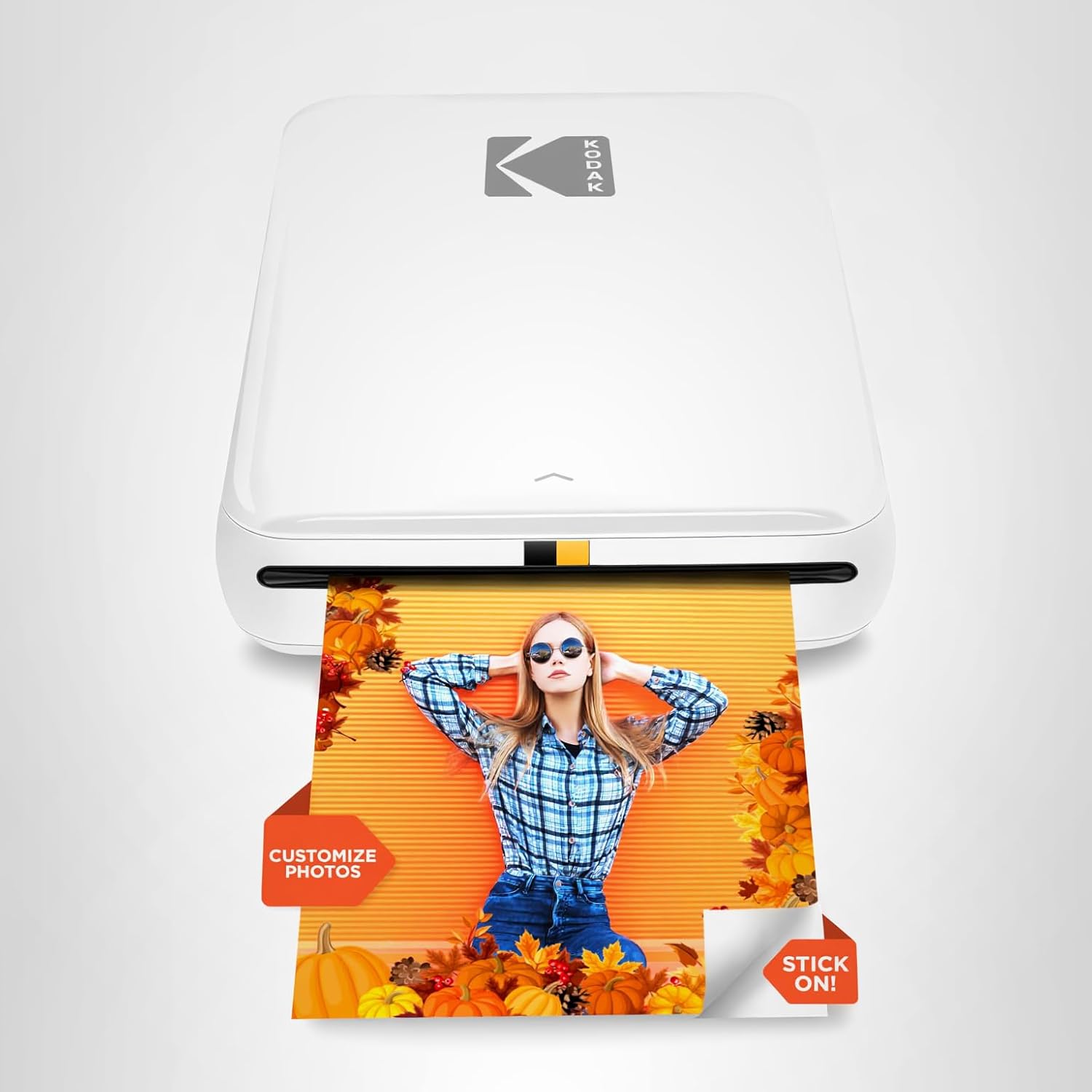
The Kodak Step Instant Photo Printer was designed for one job: turning the photos trapped on your phone into real, physical prints you can hold, stick, scrapbook, or share. And honestly, it does that job with a kind of simplicity that feels refreshing.
Instead of traditional ink, it uses Zink (Zero Ink) 2×3-inch sticky-back photo paper. The dye crystals are already embedded in the paper—heat activates them during printing. It sounds like tech wizardry, but the main perks are simple:
no cartridges, no mess, no leaks, and prints that resist moisture, tears, smudges, and coffee spills (been there).

Bluetooth is the main way you connect—whether you’re on Android or iOS. A few users mention that NFC works too, but Bluetooth remains the more stable option. And the whole setup weighs only 0.07 kg, which is hilariously light. You could literally forget it in a jacket pocket.
Inside the app (which is where a lot of the action happens), you get access to filters, collages, borders, stickers, and small edit controls. Real users seem split on the app—some adore the customization, others complain about freezing or disconnects. One reviewer even said she has to keep toggling Bluetooth to get it to cooperate.
Still, what keeps this printer #1 in its category is the promise of print-anywhere creativity. Whether it’s a travel journal, a baby book, or your kid’s “look what I made today” scrapbook, the Kodak Step makes those moments feel more “real.”
Design & Build Quality
The first time you pick up the Kodak Step Instant Mobile Photo Printer, you’ll probably think, “Wait… that’s it?” It’s genuinely that small. And “cute” might be the best word—users describe it as compact, simple, and honestly kind of aesthetic. If you’re into the whole minimalist desk vibe: big win.
The casing feels lightweight but not cheaply hollow. It’s made for portability, not rugged use, but most buyers keep it in a tote, purse, or even a makeup pouch without issues. The top-loading design makes adding paper intuitive—slide the lid, drop the Zink sheets, done.

Colors vary (white, pink, blue, black), giving users a little personality choice. One reviewer even mentioned buying different colors as gifts because they just “look fun.” And I get that. Not every gadget needs to look like a black brick.
Durability-wise, the printer holds up… mostly. Some users have reported streaks after heavy use or mechanical issues after a month, but many have the opposite experience—perfect prints after hundreds of photos. The inconsistency seems tied to Zink paper storage or occasional roller issues.
Setup & Ease of Use
Setting up the Kodak Step printer is usually quick. You download the Kodak Step app, turn on Bluetooth, open the app, and it finds the printer. Most buyers describe this part as painless.
Now, here’s the thing—like every budget-friendly photo gadget, the app is both your best friend and occasional nemesis.
Users consistently say:
- It freezes
- It disconnects
- Sometimes it refuses to print unless you restart it
- Occasionally you have to screenshot the picture and import that instead
It’s not unusable by any means—most people still rate the printer 4–5 stars—but it does mean you’ll want a little patience.
A few tips from real users:
- Keep your phone’s Bluetooth clear—disconnect unused devices.
- Update the app (new versions fix a lot).
- Don’t overload the printer with edits—complex collages slow things down.
- Store Zink paper in a cool, dry place to avoid jams or odd streaks.
Once you figure out your rhythm, printing becomes ridiculously simple. One tap and your photo appears in about 40–50 seconds.
Performance & Daily Use
In everyday usage, the Kodak Step Instant Photo Printer does exactly what people buy it for: delivering quick, cute little photos you can stick anywhere.
But let’s talk quality—because this is where expectations matter.
If you’re expecting studio-quality prints, you’ll be disappointed. The output leans slightly soft with occasional color bias—some users mention a pink-ish tone, others say the image looks less bright than on-screen. But most agree that the prints are perfect for journals, scrapbooks, mood boards, or kid crafts.

And honestly? The imperfect, slightly retro feel is part of the charm. Think of it as more “memory vibe” than “professional print.”
Real-world notes from users:
- After 10–15 consecutive prints, mild streaking may occur—usually temporary.
- Printing too many images in a row can warm the printer, causing minor color shifts.
- Bright, well-lit photos with natural lighting print significantly better.
- Dark photos lose more detail, which is typical for Zink printers.
Speed is consistent: about a minute per print. Fast enough to enjoy, slow enough to appreciate the moment (or grab coffee while you wait).
Interestingly, journalers and scrapbookers love it the most. One user mentioned she printed all 50 sheets in a single day—another said it changed how she documents her baby’s milestones.
For travel use, it’s a hit. For professional or archival photos? Not so much.
Battery Life & Durability
The Kodak Step prints around 25 photos per full charge, which is a sweet spot for casual journaling or event scrapbooking. It recharges via Micro-USB (not USB-C, unfortunately), taking roughly an hour or so.
Battery drain is minimal when idle, and many users say they forget to charge it for weeks.
Durability is where feedback varies most:

- Many say the printer stays reliable for years.
- A handful report breakdowns after a month, along with poor customer support.
The biggest hardware failure seems to be:
- The printer incorrectly reading “no paper.”
- Roller issues causing streaking or misfeeds.
These aren’t universal issues, but you should be aware of them.
The prints themselves, however, are durable—smudge-free, waterproof, tear-resistant, and sticker-backed.
Extra Features
Because everything happens through the Kodak app, that’s where you’ll find the bonus features:
- Collage templates
- Fun filters
- Borders
- Stickers
- Text overlays
- Cropping & basic edits
It also supports printing social media-style layouts, so if you love journaling your daily Instagram posts, this fits perfectly into that workflow.
No subscription is required, which is refreshing. The only consumable is Zink paper—and yes, it can get expensive, especially if you’re printing in bulk.
Comparisons & Alternatives
If you’re wondering how the Kodak Step Wireless Mobile Photo Printer stacks up against its rivals, here’s the gist:
Fujifilm Instax Mini Link 2
- Uses real Instax film (more vibrant, higher quality).
- Prints are more expensive per photo.
- Better long-term color stability.
- Bigger footprint, less “sticker-friendly.”
HP Sprocket (2nd Edition)
- Another Zink printer, similar price.
- HP’s app is slightly more stable.
- Print quality is comparable—sometimes warmer.
- Kodak tends to deliver more consistent sharpness in reviews.
Canon Ivy
- Strong, crisp output—they’re known for slightly better dynamic range.
- App is feature-rich, but some find the interface cluttered.
- Usually costs a little more.
In short: the Kodak Step is best for affordability and fun creativity. If you’re focused on premium print quality, Instax or Canon Ivy win.
And if you’re exploring digital cameras too, you might compare workflow with something like the vjianger 4K digital camera review to see how portable imaging tools fit together.
Discover Top Accessories for Every Device
From Computer, Mobile, Smartwatch, Tablet to Gaming Accessories.
Who Should Buy the Kodak Step Printer?
This little printer isn’t meant for photographers chasing pixel perfection. It’s meant for people who feel their memories more than they measure them.
Ideal buyers include:
- Journaling lovers who want instant prints for aesthetic spreads.
- Scrapbookers who enjoy crafting with stickers and mini-photos.
- Parents building baby books or milestone albums.
- Travelers documenting trips on the go.
- Teens and creators decorating binders, laptops, or gifts.
- Anyone who wants simple, no-ink, no-fuss printing.
If you’re someone who procrastinates printing photos because it’s “too much effort,” the Kodak Step solves that problem instantly.
Pros & Cons
Here’s what I like and don’t like…
Pros
- Super lightweight and travel-friendly.
- Fun editing app—filters, borders, stickers.
- Zink paper = no ink cartridges, no mess.
- Sticky-back prints are great for journals and crafts.
- Affordable compared to competitors.
- Prints look charming and nostalgic.
Cons
- The app glitches more often than it should.
- Zink paper costs add up fast.
- Print quality isn’t studio-level (expected, but still).
- Some users report streaking or roller issues.
- Micro-USB charging feels outdated in 2026.
Final Verdict
So—is the Kodak Step Instant Photo Printer worth it in 2026?
Honestly… yes. For the right person.
If you’re into journaling, scrapbooking, travel memories, or just love the nostalgia of tiny prints, this device is one of the most fun, affordable gadgets you can add to your creative workflow. The print quality won’t blow your mind, but it will warm your heart—cheesy but true.
Just keep in mind the app quirks and ongoing cost of Zink paper.
If that sounds good to you, it’s a fantastic buy.
👉 Check current price on Amazon—it might be discounted
Why You Can Trust Us:
I’ve spent years researching, testing, comparing, and writing about consumer tech—from cameras to portable printers to quirky accessories like the Polaroid Go instant camera film and budget shooters like the aboobu 5K digital camera or the Duluvulu 4K digital camera review. My reviews focus on real user feedback, long-term reliability, and practical use, not hype.
FAQs
1. Does the Kodak Step Instant Photo Printer produce high-quality prints?
Print quality is good for journaling, crafts, and casual keepsakes. Colors lean slightly warm, and details can appear softer than your phone screen. If you want professional-quality photos, go with Instax or Canon Ivy. But for memory capturing and cute sticker-style prints, it’s perfect.
2. How long do Zink prints last?
Zink prints resist water, smudges, tearing, and fingerprints. However, they may fade over several years, especially if exposed to sunlight. For long-term archival photos, traditional prints or Instax film are better. For journals and scrapbooks, Zink holds up well.
3. Is the Kodak Step printer good for kids or teens?
Absolutely. Its small size, simple app, and sticker-backed paper make it ideal for creative projects. Just teach them not to waste the Zink paper—it costs more than regular printing.
4. How often does the app glitch?
Most users experience occasional Bluetooth hiccups, freezing, or having to restart the app. It’s annoying but usually fixable. Updating the app and phone OS helps.
5. Does the printer work without Wi-Fi?
Yes! It connects via Bluetooth. You can print anywhere—from a road trip to the beach, to your couch during a late-night journal session.
If you click an Amazon link and buy something, we may earn a small commission at no extra cost to you.